Fat Worm: Integrating a Bold Display Typeface into Professional Design Workflows
In the landscape of digital typography, selecting the right typeface is rarely just about aesthetics; it is a functional decision that impacts readability, brand identity, and user experience. For designers, marketers, and content creators, the challenge often lies in balancing visual impact with legibility. This is where Fat Worm enters the workflow. As a casual, thick lettered brushed display font, Fat Worm offers a distinct texture and weight that can elevate static designs into dynamic visual statements. However, using such a prominent typeface requires more than just dragging and dropping it onto a canvas. It demands a strategic approach to integration, ensuring that its bold character enhances rather than overwhelms the overall composition.
Understanding the Anatomy of Fat Worm
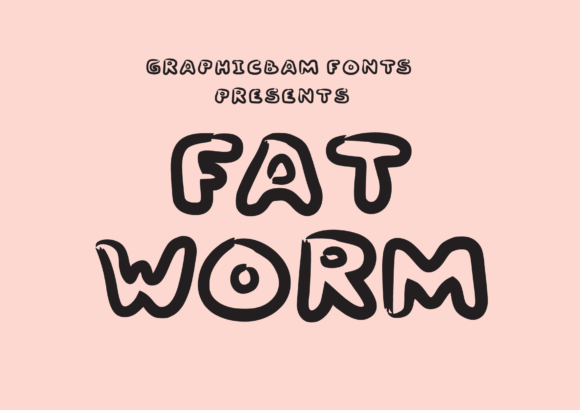
To use any tool effectively, one must first understand its capabilities and limitations. Fat Worm is categorized as a display font, which immediately signals its primary function: it is designed for large sizes and short bursts of text, not for body copy or lengthy paragraphs. The "brushed" aspect of its description refers to the simulated strokes that mimic the application of paint or ink with a wide brush. This creates an organic, hand-crafted feel that contrasts sharply with the rigid geometry of sans-serif or serif fonts.
The "thick lettering" characteristic adds weight and presence. In a design hierarchy, weight equals importance. When you apply Fat Worm to a headline, you are essentially shouting, but doing so with a stylistic flair that suggests creativity, informality, and energy. This makes it particularly suitable for projects that aim to break away from corporate sterility. It fits well within workflows that prioritize personality—such as branding for creative agencies, event posters, social media graphics, and packaging for lifestyle products.
However, the thickness of the letters introduces a specific constraint: spacing. Because the glyphs are dense, they require generous tracking (letter-spacing) and leading (line-spacing) to remain readable. A common mistake in the initial implementation phase is placing Fat Worm too tightly against other elements. Understanding this physical property is crucial for the preparation stage of any design project.
Strategic Placement in the Creative Process
Integrating Fat Worm into a workflow involves deciding when and where to deploy it. Unlike versatile body fonts like Open Sans or Roboto, which can be used across hundreds of contexts, Fat Worm has a narrower range of optimal use cases. Therefore, its introduction should be deliberate, occurring at specific nodes in the design process.
Pre-Production and Conceptualization
Before opening any design software, the decision to use Fat Worm should be part of the mood board or style guide creation. If a client or personal project requires a tone that is rugged, artistic, or retro-modern, Fat Worm might be selected as the primary display typeface. At this stage, it is essential to pair it correctly. Fat Worm performs best when contrasted with clean, minimalist sans-serifs or elegant serifs. The juxtaposition of the rough, heavy display font against a refined secondary typeface creates visual tension that draws the eye.
During this planning phase, consider the medium. Will this font be used on a high-resolution print banner, or will it be scaled down for a mobile app icon? While Fat Worm is robust, extreme scaling can cause the "brushed" details to blur or disappear, resulting in a muddy shape. Testing scalability early prevents costly revisions later.
Execution and Layout
When moving into the execution phase, the layout becomes critical. Fat Worm should serve as a focal point. Common applications include:
- Headlines and Titles: Use it for main headers where immediate impact is required.
- Logos and Wordmarks: Its unique shape can form the backbone of a memorable brand identity.
- Call-to-Action Buttons: In digital interfaces, a button labeled with Fat Worm can stand out against a neutral background, increasing click-through rates by grabbing attention.
- Accents and Pull Quotes: Using it sparingly for single words or short phrases can add texture without disrupting the reading flow.
A practical tip for execution is to treat the text as a graphic element rather than just information. Because of its thickness, each word occupies significant negative space. Designers should plan their margins and padding around these words as if they were images. Overcrowding Fat Worm defeats its purpose; it needs room to breathe.
Technical Implementation and Compatibility
For professionals working across multiple platforms—from Adobe Creative Cloud to web development environments—ensuring compatibility is a key part of the workflow. Fat Worm, being a display font, may not be available on all systems. To maintain consistency across teams, it is vital to embed the font files correctly or convert text to outlines for final export, depending on the output format.
When preparing assets for web use, consider the file size. Display fonts can sometimes have complex vector paths due to the brushed texture. Optimizing these paths ensures faster load times without sacrificing quality. Additionally, always provide fallback fonts in your CSS stylesheets. If a user’s device does not support Fat Worm, the design should degrade gracefully to a similar heavy sans-serif, preserving the structural integrity of the layout even if the specific aesthetic is lost.
Maintaining Quality Control and Consistency
As Fat Worm is integrated into various projects, maintaining a consistent standard of usage is essential for brand coherence. Inconsistency arises when the font is used improperly—for instance, in long blocks of text or with insufficient contrast against backgrounds. Establishing a set of guidelines helps mitigate these risks.
Quality control checks should include:
- Legibility Test: Reduce the design to grayscale. Does the text still hold up? The high contrast of Fat Worm usually aids this, but ensure the background color does not clash with the dark weight of the letters.
- Spacing Audit: Check kerning pairs. Thick fonts often reveal uneven spacing issues more readily than thin fonts. Adjust manual kerning where necessary to ensure a smooth visual rhythm.
- Contextual Relevance: Ask whether the casual nature of the font aligns with the message. Fat Worm conveys approachability and creativity. It may not be suitable for legal documents, financial reports, or healthcare communications where trust and precision are paramount.
Long-Term Value and Adaptation
Typography trends shift, but certain display fonts endure because of their versatility and distinctive character. Fat Worm’s blend of casualness and boldness gives it a timeless quality that fits well in both modern minimalism and maximalist design movements. For freelancers and small business owners, investing time in mastering such specialized tools pays off by differentiating their work in a crowded market.
Furthermore, integrating Fat Worm into your workflow encourages a mindset of intentional design. It forces you to think about every pixel of negative space and every interaction between type and image. This heightened awareness often leads to better overall design decisions, even when using more mundane typefaces.
By treating Fat Worm not just as a decorative option but as a strategic component of your visual communication toolkit, you unlock its potential to create memorable, effective designs. Whether you are launching a new product, rebranding a service, or simply adding personality to a blog post, understanding how to wield this thick, brushed display font allows you to communicate with greater clarity and impact. The key lies in respecting its weight, providing it with adequate space, and pairing it thoughtfully with complementary elements to achieve a balanced, professional result.