Jaya Baru: Elevating Your Designs Without the Common Pitfalls
Typography is often the silent architect of visual communication. While images grab attention, type sustains it. For designers, marketers, and content creators seeking a modern, sophisticated aesthetic, Jaya Baru has emerged as a compelling choice. This display font brings a distinct blend of contemporary flair and elegant structure, making it suitable for high-impact applications like posters, logos, magazine covers, and digital banners.
However, simply downloading a free font and applying it to a project does not guarantee professional results. Many users overlook the nuances of display typography, leading to designs that feel cluttered, unreadable, or misaligned with their brand identity. Understanding how to leverage Jaya Baru effectively requires more than just knowing where to find it; it demands an appreciation for its specific characteristics and a strategy for its application.
Understanding the Aesthetic of Jaya Baru
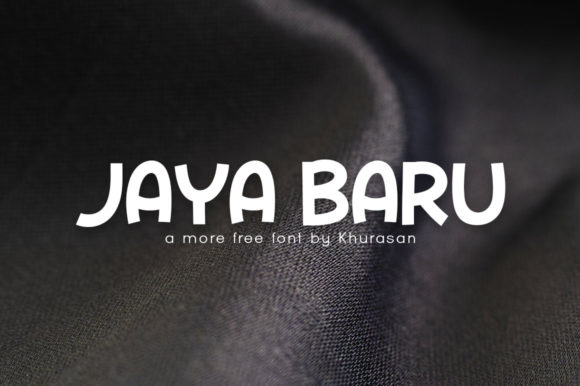
Jaya Baru is classified as a modern display font. Unlike serif or sans-serif body fonts designed for long-form readability, display fonts are crafted to be seen from a distance or at larger sizes. They possess unique personality traits—sharp angles, varying stroke weights, or distinctive ligatures—that convey mood before the viewer even reads the text.
The appeal of Jaya Baru lies in its balance. It avoids being overly ornate while still offering enough character to stand out against generic Helvetica or Arial. This makes it particularly attractive for:
- Branding and Logos: Where a single word or short phrase needs to make a strong first impression.
- Editorial Covers: Magazines and books benefit from the editorial elegance that Jaya Baru provides.
- Promotional Materials: Event posters and social media banners require immediate visual impact, which this font delivers.
Recognizing these use cases is the first step toward using the font correctly. When you understand that Jaya Baru is a "headline" font rather than a "body text" font, you immediately avoid the most common mistake in typography.
Common Mistakes in Typography Application
Even experienced designers can fall into traps when working with new typefaces. Here are several frequent errors associated with using display fonts like Jaya Baru, along with practical advice on how to correct them.
1. Overusing Display Fonts for Body Copy
The most critical error is using Jaya Baru for paragraphs of text. Display fonts are designed for brevity and impact. Their unique shapes can become visually exhausting when read in large quantities. Attempting to set long passages of text in Jaya Baru will reduce legibility and frustrate your audience.
Correction: Reserve Jaya Baru for titles, headings, pull quotes, and short labels. Pair it with a clean, highly readable sans-serif or serif font for body text. This contrast creates a hierarchy that guides the reader’s eye and maintains professionalism.
2. Ignoring Kerning and Tracking
A common misconception is that once a font is installed, the spacing between letters is automatically perfect. In reality, default kerning pairs are rarely sufficient for custom design work, especially with display fonts that have irregular shapes. Poor spacing can make a logo look amateurish or a poster title difficult to parse.
Correction: Always manually adjust the kerning (spacing between two specific characters) and tracking (overall letter spacing). Zoom in to 100% or higher to inspect the gaps between letters. Look for optical imbalances, such as excessive white space between curved and straight strokes.
3. Clashing with Incompatible Backgrounds
Jaya Baru’s modern lines may not sit well on busy or low-contrast backgrounds. If the background image competes with the intricate details of the font, the message gets lost. This is particularly relevant for web designers and social media managers who often overlay text on photos.
Correction: Ensure sufficient contrast. Use solid color overlays, drop shadows, or text outlines if necessary. Alternatively, choose placement areas in your background image that are naturally simpler and less distracting. The goal is clarity, not just decoration.
4. Neglecting Licensing and Commercial Rights
While many resources offer Jaya Baru as a "freebie," the term "free" can be ambiguous. Some fonts are free for personal use only, requiring a paid license for commercial projects such as client work, product packaging, or advertising. Assuming a font is safe for all uses without verification can lead to legal issues and financial penalties.
Correction: Before using Jaya Baru in any public-facing or commercial project, carefully review the license agreement provided by the creator. Look for explicit statements regarding "commercial use." If the license is unclear, contact the designer or purchase a proper commercial license to protect your business.
Evaluating Fit for Your Project
Not every project needs a display font. Sometimes, simplicity wins. Before committing to Jaya Baru, ask yourself what message you want to convey. Is the tone playful, urgent, luxurious, or minimalist?
Jaya Baru works best when the desired tone aligns with its modern, sleek personality. It might feel out of place in a rustic, hand-crafted artisanal brand or a corporate finance report that prioritizes tradition over trendiness. Test the font alongside other elements of your design. Does it harmonize with your color palette? Does it complement your imagery?
Creating a mockup is a low-cost way to evaluate fit. Place the text in context rather than in isolation. A font that looks good on a blank white canvas may look entirely different when surrounded by graphics, borders, and other textual elements.
Best Practices for Implementation
To get the most out of Jaya Baru, follow these practical guidelines:
- Limit Variety: Stick to one or two weights of the font family. Using too many variations within a single design can create visual chaos.
- Embrace White Space: Display fonts need room to breathe. Do not crowd your headline with surrounding text or graphics. Ample padding around the type enhances its elegance.
- Check Compatibility: If using Jaya Baru on websites, ensure you are embedding the font files correctly so they render consistently across different browsers and devices. Consider providing fallback fonts in case the custom font fails to load.
- Respect the Creator: Give credit where it is due, especially if the license requires attribution. Supporting font designers encourages the creation of more high-quality tools for the community.
Conclusion
Jaya Baru is a versatile and stylish tool for any designer’s arsenal. Its modern aesthetic adds a touch of sophistication to a wide range of media, from print to digital. However, the success of your design depends not just on the font itself, but on how wisely you apply it. By avoiding common pitfalls like overuse, poor spacing, and licensing oversights, you can ensure that your projects communicate clearly and professionally.
Take the time to experiment, pair the font thoughtfully with complementary types, and always prioritize readability and context. With these strategies, Jaya Baru can transform your visuals from ordinary to extraordinary, helping you achieve better engagement and satisfaction in your creative endeavors.