Why Limpkin Might Be the Missing Piece in Your Design Toolkit
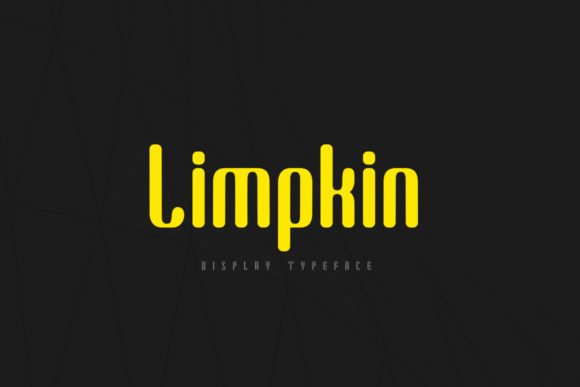
When you are scrolling through endless font libraries, searching for that perfect typeface to anchor your latest project, it is easy to feel overwhelmed. You want something that stands out but doesn’t scream for attention. You need a balance of structure and soul. This is where Limpkin often catches the eye of designers who are tired of the same generic sans-serifs dominating their screens. It is described as a cool, creative, and organic display font with just the right amount of trendiness. But having a beautiful font file on your hard drive is only half the battle. Understanding how to wield it effectively is what separates a amateur attempt from a polished professional result.
Many creators assume that because a font looks good in a preview window, it will translate seamlessly into their final output. Whether you are crafting physical greeting cards, designing digital assets for social media, or putting together a high-stakes presentation, the context matters immensely. Limpkin’s unique character—its organic curves and subtle quirks—demands respect. If you treat it like a standard body text font, you will likely end up frustrated with readability issues. Conversely, if you use it everywhere without restraint, you risk diluting its impact. Let’s look at some common pitfalls people encounter when integrating this specific typeface into their workflow and how to navigate them successfully.
The Trap of Overuse and Misplacement
The most frequent mistake I see with display fonts like Limpkin is treating them as all-purpose tools. Display fonts are designed to be seen, not read. They carry personality, texture, and weight. When you try to set long paragraphs of body copy in a font like Limpkin, the organic details can become distracting, causing eye strain and reducing comprehension. Readers may gloss over your message simply because the typography is fighting for their attention rather than supporting it.
How to avoid this: Reserve Limpkin for headlines, titles, logos, and short phrases. Think of it as the accent piece in a room, not the foundation. If you are designing a blog post, use a clean, highly readable serif or sans-serif for the main content and let Limpkin shine in the header or pull quotes. This contrast creates visual hierarchy and guides the reader’s eye naturally through your content. By limiting its use, you preserve its special quality. The audience will appreciate the elegance of the headline more because they aren’t exhausted by trying to decipher the body text.
Neglecting Pairing Strategies
A second common error is failing to pair Limpkin with complementary typefaces. Some beginners download a cool font and then struggle to find anything else that works with it, leading to a disjointed design. Because Limpkin has an organic, slightly trendy vibe, it needs a partner that provides stability. Using two competing display fonts will create chaos. Similarly, pairing it with a overly rigid geometric sans-serif might clash with its natural flow.
- Pair with simplicity: Clean, minimal sans-serifs work exceptionally well to ground the whimsy of Limpkin. The neutrality of a simple font allows the display font to take center stage.
- Maintain tonal consistency: Ensure the mood of your secondary font matches the vibe of your project. If Limpkin is being used for a playful craft project, a friendly rounded sans-serif might fit better than a strict corporate font.
When you take the time to test combinations before committing to a layout, you save hours of revision later. Look for pairings that offer contrast in weight and style but harmony in spirit. This thoughtful approach elevates the entire design, making it look intentional rather than assembled.
Overlooking Licensing and Technical Details
Before you start slapping Limpkin onto your client’s branding materials or selling printed merchandise, there is a critical step often skipped: checking the license. Fonts are intellectual property. Assuming a free download means unlimited commercial use is a dangerous assumption that can lead to legal headaches and unexpected costs. Even if you bought the font, different licenses apply to different uses—web, print, app embedding, and merchandising often have separate tiers.
Practical advice: Always read the End User License Agreement (EULA) provided by the foundry or seller. Ask yourself these questions:
- Can I use this for personal projects?
- Is commercial use permitted?
- Are there restrictions on the number of impressions or users?
- Do I need an extended license for merchandise?
Ignoring these details can compromise your project’s integrity and your peace of mind. Taking five minutes to verify licensing protects your business reputation and ensures you are using the tool ethically. It also helps you budget accurately, avoiding surprise invoices down the line.
Evaluating Quality and Readability
Not all font files are created equal. Sometimes, a download might be corrupted, or the kerning pairs might be off, leading to awkward spacing between letters. With a creative font like Limpkin, where letterforms interact closely, poor kerning can make a word look broken or unprofessional. Before finalizing any design, zoom in. Check the spacing around key letter combinations. Does the "L" sit comfortably next to the "i"? Are the descenders clipping into the line below?
If you notice inconsistencies, consider adjusting tracking manually or reaching out to the designer for updates. In digital design, ensure you are exporting in the correct format (like SVG for web or high-res PDF for print) to preserve the crispness of the organic edges. Blurry or pixelated text undermines the premium feel that Limpkin aims to deliver.
Contextual Application for Maximum Impact
One of the strengths of Limpkin is its versatility across mediums, but each medium requires a different approach. For greeting cards, the tactile nature of the paper interacts with the ink. A bold application of Limpkin can look stunning embossed or foil-stamped. However, if you are designing for mobile screens, you must account for smaller viewports. What looks majestic on a desktop monitor might become illegible on a smartphone.
For entrepreneurs and small business owners, using Limpkin in your logo or packaging can signal creativity and approachability. It suggests that your brand is human-centric and thoughtful. However, ensure it aligns with your overall brand voice. If you are a law firm, Limpkin might feel too casual unless you are targeting a very specific, modern niche. For educators and bloggers, it can add warmth to course headers or newsletter subject lines, increasing open rates by standing out in a crowded inbox.
The key is intentionality. Don’t use Limpkin just because it is trendy. Use it because it fits the narrative you are trying to tell. When the font choice supports the message, the communication becomes clearer and more engaging. Take the time to experiment with sizes, colors, and backgrounds. See how the organic shapes pop against solid colors or blend subtly with textures.
Final Thoughts on Making the Right Choice
Selecting the right typography is a strategic decision that influences how your audience perceives your work. Limpkin offers a compelling blend of cool aesthetics and organic charm, making it a valuable asset for anyone looking to add a touch of sophistication and fun to their designs. By avoiding common mistakes like overuse, poor pairing, and licensing negligence, you can harness its full potential.
Remember that good design is invisible; it facilitates understanding and enjoyment without drawing undue attention to itself. Let Limpkin highlight your best ideas, and pair it wisely. Test thoroughly, respect the license, and always keep the end-user’s experience in mind. When you do this, you move beyond just using a font to creating a cohesive, professional, and memorable visual identity. Whether you are a seasoned pro or just starting out, paying attention to these nuances will elevate your work and help you make confident, informed decisions every time you open your design software.