Qabil Font: Why This Clean Display Typeface Deserves Your Attention
Finding the right typography can feel like searching for a needle in a haystack. You want something that stands out, but not so much that it becomes unreadable. You need professionalism, but you also want personality. Enter Qabil. This cool, friendly, and neatly outlined display font has quietly become a favorite among designers who value clarity without sacrificing style. But simply downloading a font file isn’t enough to guarantee success. Understanding how Qabil works—and where people often go wrong when using it—is the key to unlocking its full potential.
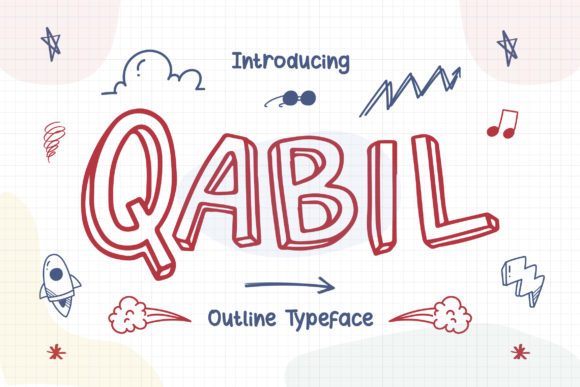
Qabil is not just another sans-serif or serif typeface. It is a display font with a distinct outline aesthetic that lends itself to bold statements. Whether you are designing a wedding invitation, creating a logo for a new startup, or printing labels for your handmade goods, Qabil offers a versatile toolkit. However, its unique structure means it requires a slightly different approach than standard body text fonts. Let’s look at what makes this font special, common pitfalls to avoid, and how to use it effectively across various projects.
Understanding the Appeal of Qabil
The primary reason creators gravitate toward Qabil is its balance. The "cool" factor comes from its modern, geometric lines, while the "friendly" aspect is achieved through rounded corners and open counters (the spaces inside letters like 'e' or 'a'). The neat outlining gives it a sticker-like quality that pops against both light and dark backgrounds. This versatility is why it appears in such diverse applications:
- Logos and Branding: Its clean lines ensure scalability. A logo needs to look good on a business card and a billboard; Qabil maintains its integrity at both sizes.
- Wedding Invitations: The friendly tone softens the formality, making events feel welcoming rather than stiff.
- T-Shirts and Apparel: The outlined style translates beautifully to screen printing and embroidery, offering a retro yet contemporary vibe.
- Signage and Posters: High contrast and clear shapes make it readable from a distance, which is crucial for marketing materials.
However, recognizing these strengths is only half the battle. Many users assume that because a font looks good in a preview image, it will work seamlessly in their final design. This assumption often leads to frustration.
The Mistake of Ignoring Context
One of the most frequent errors I see is placing Qabil in situations where legibility is compromised by background clutter. Because Qabil is an outlined font, it relies heavily on the negative space around and within the characters. If you place white-outlined text on a busy, multi-colored photograph, the letters will disappear into the noise. Conversely, black outlines on a dark background can create a muddy effect that strains the eye.
Practical Advice: Always test your font against the actual background you intend to use. Don’t rely on a plain white canvas in your design software. Use a mockup that mimics your final environment. If the text feels hard to read in a low-contrast scenario, consider adding a subtle drop shadow or a solid backing shape behind the text to separate it from the background.
Weight and Hierarchy: Avoiding Visual Noise
Another common misunderstanding involves the weight and density of Qabil. Display fonts are designed to be seen, not read in bulk. Using Qabil for long paragraphs of body text is a mistake that dilutes its impact and reduces readability. The outlined nature of the letters creates visual vibration when repeated many times, causing eye fatigue for the reader.
Furthermore, overusing Qabil in a single design can lead to a lack of hierarchy. If every headline, subhead, and button uses the same font, the user doesn’t know where to look. Design relies on contrast—both in size and typeface—to guide the viewer’s eye.
Better Approach: Use Qabil strictly for headlines, titles, logos, and short phrases. Pair it with a simple, highly readable sans-serif or serif font for body copy. For example, you might use Qabil for a large "Sale" banner, but pair it with a clean Arial or Roboto for the terms and conditions below it. This combination leverages Qabil’s personality while maintaining functional communication.
Kerning and Spacing Oversights
Even with a well-designed font, poor spacing can ruin the aesthetic. Outlined fonts like Qabil often require slightly more tracking (letter-spacing) than solid fonts to breathe properly. Tight kerning can cause the outlines of adjacent letters to touch or overlap, creating unintended shapes that confuse the viewer. Additionally, leading (line spacing) must be generous. If lines are too close together, the internal outlines of the letters may clash, making the text block look dense and heavy.
To avoid this, always zoom out after setting your text. What looks perfect up close may look cramped from a normal viewing distance. Adjust your tracking to give each letter room to stand on its own. In professional design software, you can often adjust these settings manually, but sometimes automatic kerning pairs need tweaking for display fonts.
Licensing and Commercial Use
Before you start slapping Qabil on your merchandise, you must address the legal side. A major oversight among beginners is assuming that all free-to-download fonts are free for commercial use. While Qabil might be available for personal projects, using it for client work, product packaging, or advertising usually requires a commercial license.
Using a font without the proper license can lead to cease-and-desist letters, fines, and reputational damage. It undermines the trust you’ve built with your audience. Moreover, it disrespects the designer’s labor.
Action Step: Check the license agreement provided by the font creator or distributor. Look for keywords like "commercial use," "print run limits," or "embroidery rights." If you plan to sell t-shirts featuring Qabil, ensure the license explicitly covers apparel production. When in doubt, contact the foundry directly. It is better to pay a reasonable fee for peace of mind than to risk legal issues later.
File Formats and Resolution
Finally, technical preparation matters. If you are sending Qabil to a printer, vector formats (like .AI, .EPS, or .SVG) are essential. They allow the font to scale infinitely without losing quality. Raster formats (like .JPG or .PNG) can pixelate if scaled up, especially with the fine details of an outlined font.
If you must use raster images, ensure they are high-resolution (at least 300 DPI for print). Low-resolution outlines will appear jagged and unprofessional, detracting from the sleekness that Qabil is supposed to convey. Also, verify that your design software supports the specific character set of Qabil. Some specialized display fonts include ligatures or alternate glyphs that enhance the design; missing these can result in a generic look.
Conclusion: Making the Right Choice
Qabil is a powerful tool in any designer’s arsenal. Its cool, friendly, and neat aesthetic makes it suitable for a wide array of creative endeavors, from elegant wedding invites to bold streetwear graphics. However, its effectiveness depends on how thoughtfully you apply it. By avoiding common mistakes—such as ignoring background contrast, overusing the font for body text, neglecting spacing, skipping licensing checks, and using low-resolution files—you can ensure your designs look polished and professional.
Take the time to experiment. Create mockups. Test different color combinations. And always prioritize clarity alongside creativity. When used correctly, Qabil doesn’t just fill space; it communicates with confidence and style.